
Camera Modes
Learn DSLR Camera Modes | Guide to Photography Settings
Discover how to use DSLR camera modes with ease. From Auto to Manual, learn what each mode does and how to take control of your photography for better, more creative shots.
Camera Modes on Your Camera
Learn DSLR Camera Modes | Guide to Photography Settings
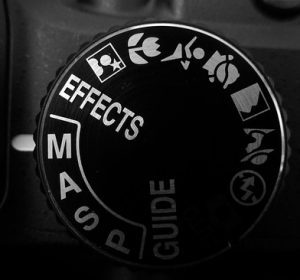
If you have your DSLR camera or equivalent close by, compare your camera’s modes with the camera modes on this page. Terms for camera modes may slightly vary with each manufacturer.
Overview of Camera Modes
Learn DSLR Camera Modes | Guide to Photography Settings
Modern cameras offer a range of shooting modes designed to give photographers different levels of control over exposure and creative style. One of the most commonly used is Auto Mode, which lets the camera make all decisions about shutter speed, aperture, ISO, and white balance. This is useful for beginners or quick snapshots but offers little flexibility. Program Mode (P) is a step up, still automating most settings while allowing the photographer to adjust certain parameters like ISO, white balance, or exposure compensation. It provides more creative input while keeping the process simple.
For more control, cameras include Aperture Priority (A or Av) and Shutter Priority (S or Tv) modes. Aperture Priority allows the photographer to set the lens opening (f-stop) while the camera automatically selects a suitable shutter speed. This is ideal for controlling depth of field, such as creating a blurred background in portraits or ensuring everything is sharp in landscapes. Shutter Priority, on the other hand, lets the photographer control motion by choosing the shutter speed—use a fast shutter to freeze action or a slow shutter to create motion blur in waterfalls or light trails.
Auto Mode: Simplifying Photography
Auto mode is ideal for beginners or when you want the camera to handle all settings automatically. It’s great for quick shots without worrying about technical details.
01
Program Mode: Balancing Control and Convenience
Program mode gives you more control over settings like ISO, aperture, and shutter speed while the camera still manages some aspects. It’s versatile for various shooting conditions.
02
Aperture Priority (A/Av): Controlling Depth of Field
In aperture priority mode, you set the aperture (f-stop), allowing control over depth of field. This mode is ideal for portraits with a blurry background or landscapes with sharp details.
03
Shutter Priority (S/Tv): Capturing Motion
Shutter priority mode lets you control the shutter speed, crucial for capturing moving subjects. It’s perfect for sports photography or artistic blur effects.
04
Manual Mode: Total Creative Control
Manual mode offers complete control over aperture, shutter speed, ISO, and more. It’s essential for mastering exposure and achieving unique effects.
05
Scene Modes: Optimising for Specific Conditions
Many cameras offer scene modes tailored for specific environments or subjects, such as portrait, landscape, night, or macro. These presets adjust settings for optimal results.
06
Custom Modes: Personalising Your Setup
Some cameras allow you to save custom settings for quick access, ideal for recurring shooting conditions or personal preferences.
07
Conclusion: Enhancing Your Photography Journey
Learn DSLR Camera Modes | Guide to Photography Settings
Understanding and mastering these camera modes will unlock endless creative possibilities in your photography. Whether you prefer the simplicity of auto mode or the full control of manual mode, each mode serves a unique purpose in capturing memorable images.
By exploring and experimenting with these modes, you’ll not only improve your technical skills but also develop a deeper appreciation for the art of photography. Start applying these insights today to see immediate improvements in your photographic outcomes.
1. Cameras: Choosing the Right Tool for Your Vision
Selecting the right camera is crucial for achieving your photographic goals. From versatile DSLRs to compact mirrorless cameras, we explore the features and benefits that suit different shooting styles and preferences. Learn about sensor sizes, megapixel counts, and the latest advancements in camera technology to make an informed decision.
2. Lenses: Expand Your Creative Possibilities
Lenses are the eyes of your camera, offering a wide range of focal lengths and apertures to capture stunning images. Dive into our comprehensive lens guide, covering prime lenses for sharpness and low-light performance, zoom lenses for versatility, and specialised lenses like macro and fisheye for unique perspectives.
3. Tripods and Supports: Stability for Sharper Shots
Ensure stability and precision with our selection of tripods, monopods, and stabilisers. Discover how these accessories help you achieve sharper images, smoother videos, and allow for creative long-exposure photography. Explore lightweight options for travel or heavy-duty setups for studio work.
4. Lighting Equipment: Illuminate Your Vision
Master the art of lighting with our collection of studio lights, flashes, and modifiers. Whether you’re shooting portraits, landscapes, or products, understand how different lighting setups can dramatically enhance your compositions. Learn about continuous lighting versus strobes and the impact of color temperature on your images.
5. Camera Bags and Cases: Protect Your Investment
Safeguard your gear with our range of durable and ergonomic camera bags and cases. Explore options that cater to different types of photography, from backpacks for outdoor adventures to rolling cases for professional shoots. Learn about features like weather resistance, customisable dividers, and accessibility for quick gear changes.
6. Accessories: Enhance Your Shooting Experience
Discover a variety of essential accessories to complement your camera setup. From memory cards and batteries to remote shutter releases and lens filters, these small but crucial items can make a big difference in your workflow. Explore our recommendations for accessories that streamline your shooting process and extend your creative capabilities.
7. Software and Editing Tools: Refine Your Vision
Unlock the full potential of your images with post-processing software and editing tools. Learn about popular options for editing RAW files, enhancing colours and details, and creating stunning visual effects. Explore workflow tips and techniques to streamline your editing process and achieve professional-quality results.